library(sf)       # Spatial data handling
library(xml2)     # Parsing XML/SVG
library(rvest)    # Web scraping
library(httr2)    # HTTP requests
library(stringr)  # String manipulation
library(dplyr)    # Data manipulation
library(here)     # Robust project-relative paths

# We build the path to the current post directory.
post_dir <- here("posts", "nepal-election-geojson")

# 2. Define paths to data folder
wards_geojson_path    <- here::here(post_dir, "data", "nepal-wards.gpkg")
national_geojson_path <- here::here(post_dir, "data", "nepal-national.gpkg")

# 3. Define output paths
output_svg_path       <- here::here(post_dir, "output", "nepal_electoral_map.svg")
rough_map_path <- here::here(post_dir, "output", "nepal_svg_rough.geojson")
output_geojson_path   <- here::here(post_dir, "output", "nepal_electoral_map.geojson")

# Ensure output directory exists
if (!dir.exists(dirname(output_svg_path))) dir.create(dirname(output_svg_path), recursive = TRUE)1 Introduction
In this workflow, we tackle a common geospatial problem: extracting data from stylized news graphics (like election heatmaps) and converting them into GIS-ready formats.
Rather than just cleaning the rough edges of a scraped SVG, we will use a reconstruction technique. We will:
- Scrape the electoral map to get rough constituency shapes.
- Georeferencing the shapes to align them with real coordinates.
- Reconstruct the precise boundaries by grouping official administrative “Wards” based on which constituency shape they fall into.
2 1. Setup and Libraries
We use sf for spatial operations and rvest for scraping. We also define paths for our inputs (official ward data) and outputs.
3 Scraping the SVG
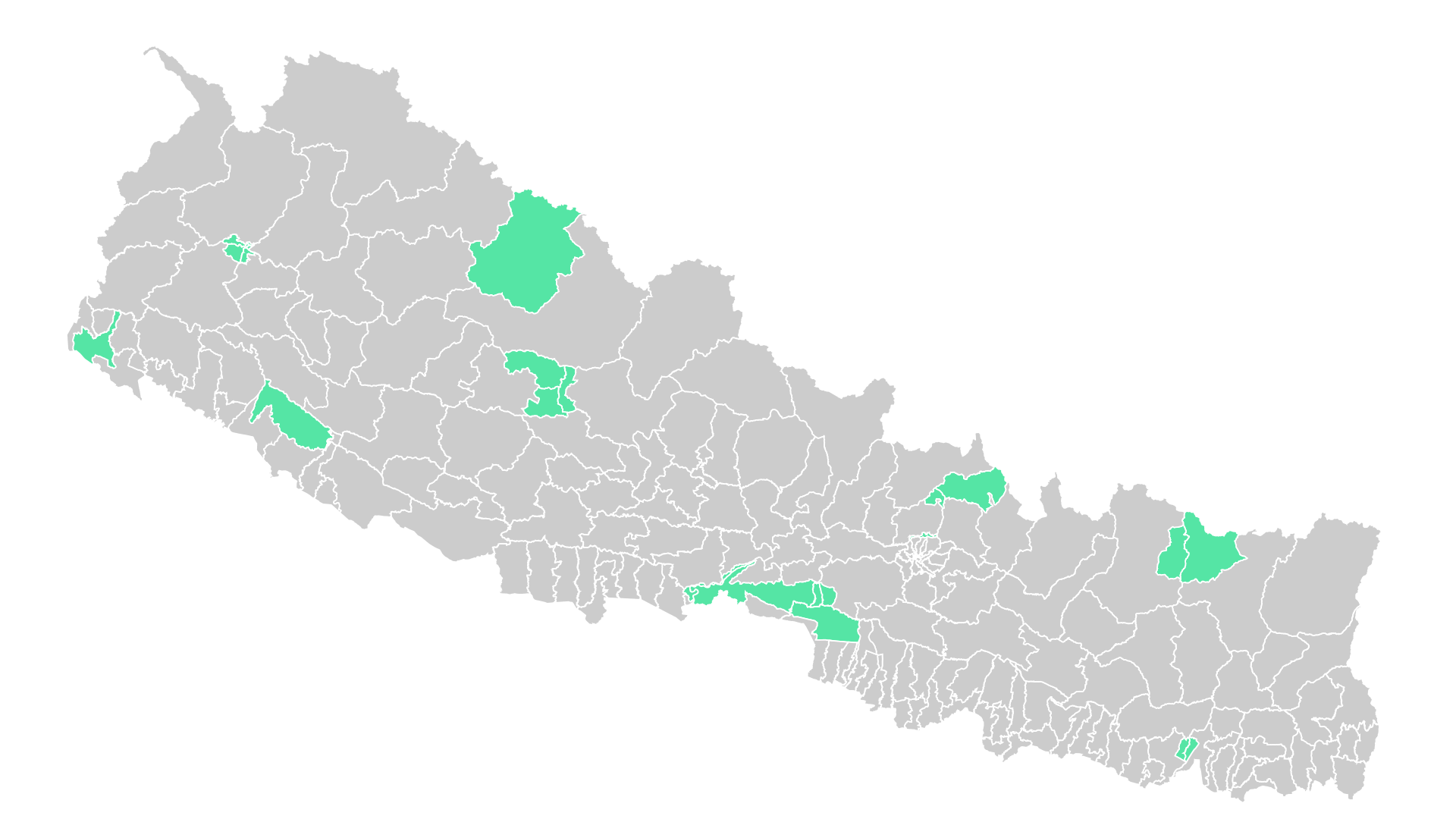
We use httr2 to fetch the webpage and rvest to extract the specific SVG element containing the map. We also inject some CSS to ensure the map renders correctly if viewed in a browser (e.g., setting the viewBox and handling overflow).
url <- "https://generalelection2079.ekantipur.com/heatmap"

message("Fetching data from: ", url)

tryCatch({
  # 1. Fetch Content
  req <- request(url) |>
    req_user_agent("Mozilla/5.0 (Windows NT 10.0; Win64; x64) AppleWebKit/537.36")

  resp <- req_perform(req)
  html_content <- resp_body_html(resp)

  # 2. Extract SVG (Select by pattern ID specific to this map)
  svg_node <- html_element(html_content, xpath = "//svg[.//pattern[@id='np__BG']]")

  if (!inherits(svg_node, "xml_missing")) {
    # Fix viewBox for consistency (1920x1080)
    xml_set_attr(svg_node, "viewBox", "0 0 1920 1080")

    # Add CSS for better visibility
    css_styles <- "
      path { fill: #cccccc; stroke: #fff; cursor: pointer; stroke-width: 1.75px; }
      path:hover { opacity: 0.9; }
      .national-park { fill: #55e5a5 !important; }
      svg { overflow: visible !important; }
    "
    xml_add_child(svg_node, "style", css_styles, .where = 0)

    # Save to output folder
    write_xml(svg_node, output_svg_path)
    message("Success! Raw SVG saved to: ", output_svg_path)

  } else {
    warning("SVG element not found on the page.")
  }
}, error = function(e) {
  message("Error fetching URL: ", e$message)
})
4 Parsing SVG Paths to Geometry
SVG paths are stored as strings in the d attribute. We need a robust parser to convert these strings into numerical coordinates. This function handles messy spacing and implicit commands often found in web SVGs.
# Function to robustly handle SVG path strings (fixes minified negatives)
parse_d_robust <- function(d) {
  d_clean <- str_replace_all(d, "-", " -")             # Handle "100-100"
  d_clean <- str_replace_all(d_clean, "[a-zA-Z]", " ") # Remove commands
  nums <- as.numeric(str_split(d_clean, "[\\s,]+")[[1]])
  nums <- nums[!is.na(nums)]

  if(length(nums) < 4) return(NULL)

  mtx <- matrix(nums, ncol = 2, byrow = TRUE)
  # Close polygon if open
  if (!all(mtx[1,] == mtx[nrow(mtx),])) mtx <- rbind(mtx, mtx[1,])
  if (nrow(mtx) < 4) return(NULL)

  return(mtx)
}

# Extract paths from the scraped SVG content
path_nodes <- xml_find_all(svg_node, "//*[local-name()='path']")

polys_list <- list()
id_list <- character()

for (i in seq_along(path_nodes)) {
  d_attr <- xml_attr(path_nodes[i], "d")
  id_val <- xml_attr(path_nodes[i], "data-slug")

  # --- UI FILTER FIX ---
  # Strictly skip paths that lack a data-slug (buttons, background rects)
  if (is.na(id_val) || id_val == "") next

  coords <- parse_d_robust(d_attr)
  if (!is.null(coords)) {
    polys_list[[length(polys_list) + 1]] <- st_polygon(list(coords))
    id_list <- c(id_list, id_val)
  }
}

if (length(polys_list) == 0) stop("No valid map districts found after filtering.")

# Create initial SF object (Raw SVG Coordinates)
nepal_sf <- st_sf(constituency_id = id_list, geometry = st_sfc(polys_list))
5 Georeferencing (Affine Transformation)
The extracted SVG uses screen coordinates (pixels). To make this map useful, we must align it with the real world (Longitude/Latitude).
We do this by calculating the bounding box of a reference map (data/nepal-national.geojson) and scaling our SVG to fit those dimensions.
# 1. Load Reference Map
if (!file.exists(national_geojson_path)) stop("Reference map not found.")

nepal_ref <- st_read(national_geojson_path, quiet = TRUE)

# 2. Project Reference to Web Mercator (EPSG:3857)
# This gives us the correct target aspect ratio for a web map
target_bbox <- st_bbox(st_transform(nepal_ref, 3857))

# 3. Affine Transformation
# Flip Y-axis (SVG top-left origin -> Map bottom-left origin)
flip_matrix <- matrix(c(1, 0, 0, -1), ncol = 2)
nepal_sf$geometry <- nepal_sf$geometry * flip_matrix

# Calculate Scale Factors
src_bbox <- st_bbox(nepal_sf)
src_w <- src_bbox$xmax - src_bbox$xmin
src_h <- src_bbox$ymax - src_bbox$ymin

tgt_w <- target_bbox$xmax - target_bbox$xmin
tgt_h <- target_bbox$ymax - target_bbox$ymin

# Shift SVG to (0,0)
nepal_sf$geometry <- nepal_sf$geometry - c(src_bbox$xmin, src_bbox$ymin)

# Scale to match Reference size
scale_matrix <- matrix(c(tgt_w / src_w, 0, 0, tgt_h / src_h), ncol = 2)
nepal_sf$geometry <- nepal_sf$geometry * scale_matrix

# Shift to Reference position
nepal_sf$geometry <- nepal_sf$geometry + c(target_bbox$xmin, target_bbox$ymin)

# 4. Assign CRS (Web Mercator)
st_crs(nepal_sf) <- 3857
# Create interactive map
mapview::mapview(nepal_sf)6 Reconstruction via Wards
The transformed SVG is roughly accurate but has “jagged” borders and low-quality topology. To fix this, we use the Wards method:
- Convert high-quality Ward polygons to centroids.
- Check which rough SVG shape each Ward centroid falls into.
- Dissolve (merge) the Ward polygons based on that grouping.
This results in a map that perfectly matches official administrative boundaries.
message("Reconstructing boundaries using Wards...")

# 1. Load Wards Data
if (!file.exists(wards_geojson_path)) stop("Wards GeoJSON not found.")
wards <- st_read(wards_geojson_path, quiet = TRUE) |>
  st_make_valid()

# 2. Project to Metric (UTM Zone 45N) for accurate cleanup
# Nepal falls mostly in UTM 45N (EPSG:32645)
wards_utm <- st_transform(wards, 32645)
nepal_utm <- st_transform(nepal_sf, 32645) |> st_make_valid()

# 3. Assign Wards to Constituencies
message("Matching wards to constituencies...")
sf_use_s2(FALSE) # Use GEOS for the join
ward_centroids <- st_centroid(wards_utm)
nearest_indices <- st_nearest_feature(ward_centroids, nepal_utm)
wards_utm$constituency_id <- nepal_utm$constituency_id[nearest_indices]

# 4. Dissolve and Clean Slivers
message("Dissolving geometries and removing slivers...")

# SNAP TO GRID: Rounds coordinates to nearest 1mm to prevent tiny float errors
# wards_utm <- st_set_precision(wards_utm, 1000)

final_map_utm <- wards_utm |>
  group_by(constituency_id) |>
  summarise(geometry = st_union(geom)) |>
  st_make_valid() |>
  # SLIVER REMOVAL: 1 meter expansion and contraction
  st_buffer(dist = 1) |>
  st_buffer(dist = -1) |>
  st_make_valid()

# 5. Transform back to WGS84 for GeoJSON export
final_map <- st_transform(final_map_utm, 4326)
# Create interactive map. The widget embeds every vertex in the page, so map a
# simplified copy (200 m tolerance). The exported GeoJSON below stays full resolution.
final_map_preview <- final_map_utm |>
sf::st_simplify(preserveTopology = TRUE, dTolerance = 200) |>
st_transform(4326)
mapview::mapview(final_map_preview)
TipDownload the output files:

Citation
BibTeX citation:
@online{bhandari2026,
  author = {Bhandari, Pukar},
  title = {Nepal {Electoral} {Constituency} {GeoJSON}},
  date = {2026-01-18},
  url = {https://ar-puuk.github.io/posts/nepal-election-geojson/},
  langid = {en-US}
}
For attribution, please cite this work as:
Bhandari, Pukar. 2026. “Nepal Electoral Constituency
GeoJSON.” January 18. https://ar-puuk.github.io/posts/nepal-election-geojson/.